

1. Does My Small Business Website Need to Be ADA Compliant?
Yes. There is no small business exemption in the ADA for websites. Title III of the Americans with Disabilities Act prohibits discrimination on the basis of disability in “places of public accommodation.” Since 2006, federal courts have steadily expanded this definition to include websites. By 2022, the DOJ confirmed in formal guidance that websites of businesses open to the public are subject to Title III. The ADA applies to you if your business:- Has a website that any member of the public can visit
- Sells products or services online or uses its website to serve customers
- Has a physical location that is open to the public (even partially)
- Operates in any sector that serves the general public
2. What ADA Website Compliance Actually Means
 ADA website compliance means your website must be usable by people with disabilities including those who:
- Are blind or have low vision and use screen readers (NVDA, JAWS, VoiceOver)
- Are deaf or hard of hearing and rely on captions for video content
- Have motor disabilities and cannot use a mouse relying on keyboard navigation only
- Have cognitive disabilities that make complex interfaces harder to process
- Have colour blindness affecting how they perceive content and navigation
3. The Real Cost of Non-Compliance
ADA website lawsuits against small businesses follow a consistent pattern:- A plaintiff (often represented by a firm that files hundreds of cases annually) tests your website with a screen reader or automated scanner
- They document accessibility failures even minor ones
- A demand letter arrives giving you 30 days to respond and settle
- The settlement demand is typically $10,000–$30,000 for a first-time small business case
- If you fight, legal fees to defend quickly exceed that amount
 Average small business ADA web lawsuit costs:
| Scenario | Estimated Cost |
|---|---|
| Quick settlement (demand letter) | $10,000–$30,000 |
| Negotiated settlement with attorney involvement | $25,000–$75,000 |
| Litigation to judgement | $100,000–$250,000+ |
| Proactive compliance (Accessify + manual fixes) | $200–$2,000/year |
4. What WCAG Requires for Small Business Sites
WCAG 2.1 AA has 50 success criteria, but for a typical small business website, the most critical and most frequently cited in lawsuits are:The Eight Most-Litigated Accessibility Issues
- Missing image alt text (SC 1.1.1) Every meaningful image needs a text description. Screen readers announce these descriptions to blind users. Without them, product photos, banner images, and team photos are completely invisible to screen reader users.
- Form fields without labels (SC 3.3.2) Contact forms, newsletter sign-ups, and booking forms must have visible, properly associated labels. Placeholder text disappears when users start typing it does not count as a label.
- Colour contrast failure (SC 1.4.3) Body text must have a contrast ratio of at least 4.5:1 against its background. Light grey text on white popular in modern design typically fails this test.
- Keyboard inaccessible (SC 2.1.1) Every function on your website must be operable using only the keyboard. Users who cannot use a mouse rely entirely on keyboard navigation.
- Missing page titles (SC 2.4.2) Every page must have a unique, descriptive HTML title tag. “Home” alone is not sufficient “About Us | Johnson Plumbing” is correct.
- No skip navigation link (SC 2.4.1) A “Skip to main content” link must be the first focusable element on each page, allowing screen reader and keyboard users to skip repetitive navigation on every page.
- Missing captions on video (SC 1.2.2) If your website includes video testimonials, product demos, how-to guides each video needs accurate closed captions.
- Insufficient focus indicators (SC 2.4.7) When keyboard users Tab through your site, each focusable element must show a clearly visible focus ring. Many modern themes remove this for aesthetic reasons, creating a major barrier.
5. The 5 Most Common ADA Failures on Small Business Websites
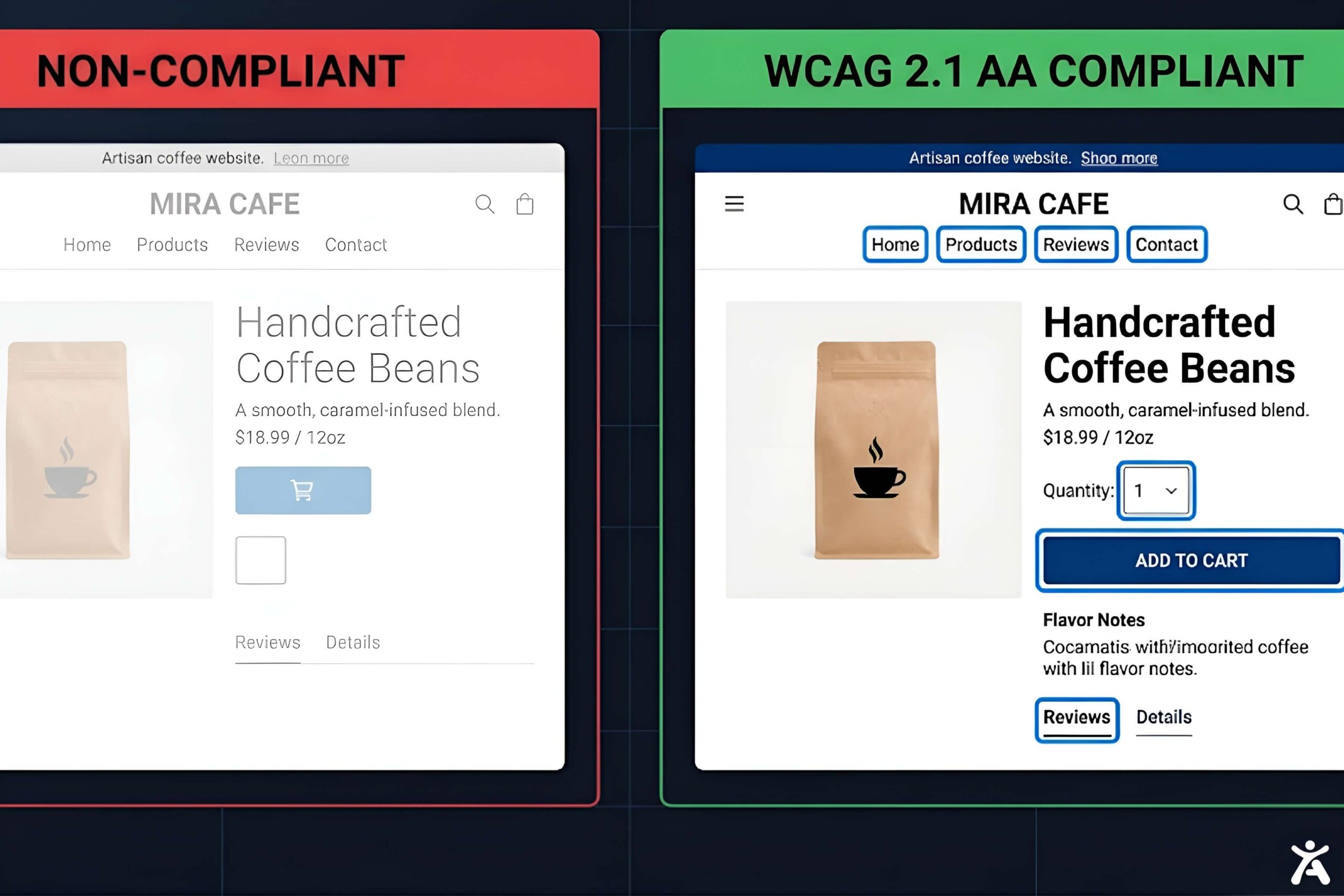 Based on real ADA demand letter filings and WebAIM audit data, the five failures most commonly cited in small business ADA lawsuits are:
1. Online ordering and booking forms with no field labels
Restaurants, service businesses, and professionals with booking forms are high-risk. If your reservation, appointment, or quote form uses placeholder text instead of labels, you have a documented WCAG violation.2. E-commerce product images without alt text
Even a simple product catalogue with unlabelled photos creates significant WCAG failures. Plaintiff firms use automated scanners that immediately detect missing alt text across an entire site.3. Colour contrast failures in hero sections and CTAs
Call-to-action buttons and headlines styled in brand colours frequently fail contrast requirements. A white “Book Now” button on a medium-blue background popular in travel and hospitality typically fails 4.5:1.4. PDF menus, brochures, and documents
Many small businesses link to PDF documents menus, service lists, price sheets. PDFs require separate accessibility remediation and are a frequent source of ADA complaints in the restaurant and hospitality industries.5. Embedded maps without accessible alternatives
Embedding a Google Map on your Contact page without a text address alternative creates an accessibility barrier. Keyboard users can become trapped in the map iframe.6. How to Get ADA Compliant Without a Developer
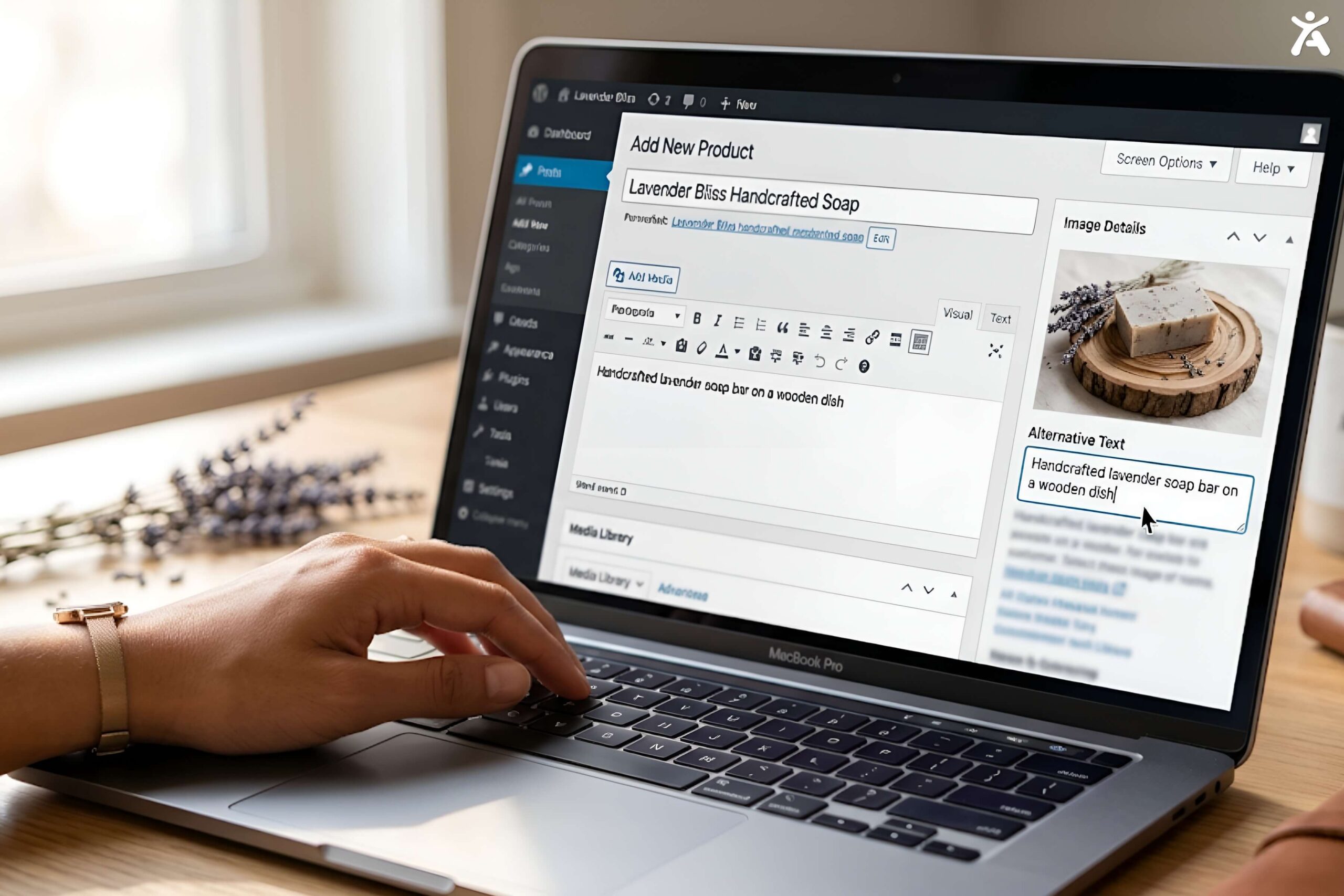 Most small business websites can achieve WCAG 2.1 AA compliance without hiring a developer. Here is the practical path:
Step 1: Run a Free Accessibility Audit
Use one of these free tools to get your baseline:- WAVE Browser Extension (Chrome/Firefox) visual, easy to interpret, no technical knowledge required
- Google Lighthouse in Chrome DevTools, run an Accessibility audit on your homepage
- Accessify Free Trial install Accessify and review the compliance dashboard for a structured issue list
Step 2: Fix Your Images
Go through your website and add alt text to every meaningful image. For most small business sites (10–30 key pages), this takes 1–2 hours. Use your CMS’s built-in image alt text field WordPress, Shopify, Squarespace, and Wix all have this.Step 3: Fix Your Form Labels
Check every form on your site. If input fields only have placeholder text, update them to have visible labels. Most CMS form builders allow label customisation without code.Step 4: Fix Colour Contrast
Test your text and background colours at webaim.org/resources/contrastchecker. Adjust your colour palette in your CMS theme settings until all body text meets 4.5:1.Step 5: Test Keyboard Navigation
Tab through your website without a mouse. If you can’t reach something or you get stuck, note it and fix it. Simple keyboard failures in WordPress and Shopify themes often have one-line CSS fixes.Step 6: Install Accessify
Once you’ve addressed the major manual issues, deploy Accessify to:- Provide users with an accessibility toolbar (contrast, text size, keyboard mode)
- Inject skip navigation if missing
- Enhance keyboard focus indicators
- Flag ongoing compliance issues in your dashboard
Step 7: Add an Accessibility Statement
Post a short Accessibility Statement on your website (in the footer or an About page). State your commitment to WCAG 2.1 AA compliance, provide a contact email for accessibility issues, and note any known limitations. This is evidence of good faith that courts and enforcement bodies view favourably.7. How Much Does ADA Compliance Cost?
For a typical small business website, here is the realistic cost breakdown:| Task | DIY Cost | Outsourced Cost |
|---|---|---|
| WAVE/Lighthouse audit | Free | $200–$500 (one-time) |
| Alt text for all images | 1–3 hours of your time | $100–$300 |
| Form label fixes | 30–60 minutes | $50–$200 |
| Colour contrast fixes | 30–60 minutes | $50–$200 |
| Keyboard navigation fixes | Variable | $200–$1,000 |
| Accessibility widget (Accessify) | Low monthly fee | Same self-install |
| Accessibility Statement | 30 minutes | $50–$150 |
| Total | Your time + widget fee | $650–$2,350 one-time |
8. How Accessify Makes Compliance Affordable
Accessify is built specifically for the small and medium business market with clear, low-cost pricing, a simple self-install process, and no technical knowledge required. What Accessify provides for small businesses:
Instant deployment: One script or plugin install. Works on WordPress, Shopify, Wix, Squarespace, Webflow, and any HTML-based site.
User accessibility toolbar: Visitors with disabilities can customise their experience adjust contrast, text size, font, motion, and keyboard mode without requiring you to manually implement every preference.
Compliance dashboard: A real-time view of your site’s accessibility status, flagging issues prioritised by WCAG impact level.
Audit trail: Documentation of your accessibility efforts valuable if you ever face a demand letter or legal inquiry.
Affordable pricing: Accessify’s entry plan is priced for small business budgets. No enterprise contracts, no per-page pricing. One flat rate covers your site.
Accessify does not promise “instant full ADA compliance” no honest tool does. What it provides is the automated layer that, combined with the manual fixes above, puts your site in a defensible WCAG 2.1 AA position for a fraction of the cost of any alternative.
Start your free Accessify trial no credit card required →
What Accessify provides for small businesses:
Instant deployment: One script or plugin install. Works on WordPress, Shopify, Wix, Squarespace, Webflow, and any HTML-based site.
User accessibility toolbar: Visitors with disabilities can customise their experience adjust contrast, text size, font, motion, and keyboard mode without requiring you to manually implement every preference.
Compliance dashboard: A real-time view of your site’s accessibility status, flagging issues prioritised by WCAG impact level.
Audit trail: Documentation of your accessibility efforts valuable if you ever face a demand letter or legal inquiry.
Affordable pricing: Accessify’s entry plan is priced for small business budgets. No enterprise contracts, no per-page pricing. One flat rate covers your site.
Accessify does not promise “instant full ADA compliance” no honest tool does. What it provides is the automated layer that, combined with the manual fixes above, puts your site in a defensible WCAG 2.1 AA position for a fraction of the cost of any alternative.
Start your free Accessify trial no credit card required →
Conclusion
The ADA does not care how small your business is. What matters is whether a disabled user can access your website and services. The good news: for a small business website, compliance is achievable in less than a day’s work. Don’t let a demand letter be your first compliance investment. The cost of getting compliant today is a rounding error compared to the cost of a settlement next quarter. Get your small business website ADA compliant with Accessify start free →FAQ
Does my small business website need to be ADA compliant?Yes. Title III of the ADA applies to websites of businesses open to the public regardless of size. There is no small business exemption for website accessibility obligations. Any business with a public-facing website that serves customers can be subject to ADA web accessibility lawsuits.
With manual fixes (alt text, form labels, contrast) and an Accessify widget install, most small business websites can reach a defensible WCAG 2.1 AA position within a day to a week of focused effort. Accessify itself installs in under 5 minutes.
Non-compliance can result in a demand letter from a plaintiff’s attorney requiring settlement (typically $10,000–$30,000), followed by a federal lawsuit if you do not respond. Defending an ADA lawsuit costs significantly more than settling. Proactive compliance is dramatically cheaper.
An accessibility widget like Accessify handles the automated remediation layer contrast profiles, keyboard navigation, focus management, skip navigation. It does not replace manual fixes for missing alt text, unlabelled forms, or video captions. The combination of both is the recommended approach.
Using Accessify and performing manual fixes yourself, total compliance cost is typically under $500 one-time (your time) plus a low monthly widget subscription. Outsourcing the manual fixes to a web developer adds $650–$2,000. Both options are a fraction of the average ADA settlement cost.